AI AVATARS
An AI avatar that talks with your customers and brings in your team
Avatar Studio puts a voice-and-video avatar on your website or in your web app. Visitors talk or type to it in English or Spanish. It answers from the brief we write with you, asks the questions you choose, and brings in a person from your team, in the same call, when the visitor is ready.
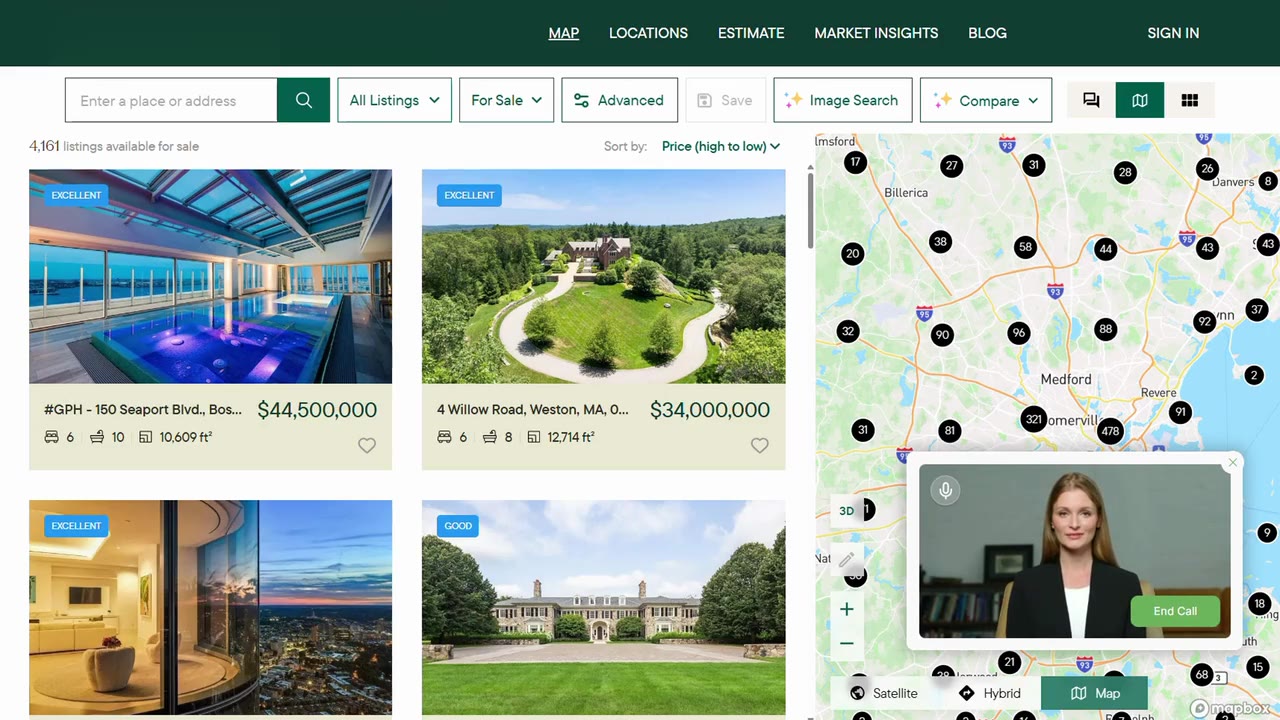
From the first question to a person on your team
A chat widget answers and waits. Avatar Studio holds a real conversation by voice or text, gathers what your team needs to know, and hands the visitor to a person without losing them.
- Talks or types, in English or Spanish
- Visitors speak or type in their own words, and can send a file with a message. The avatar answers in the visitor’s language, by voice and in text.
- Asks the questions you choose
- Your form’s questions, such as timeline or budget, are asked one at a time in the flow of the conversation, with the consent you require, and the answers go to your team.
- Asks before it brings in a person
- When a visitor is ready, the avatar asks whether they would like to talk to someone, then brings in the person you set up for that conversation.
- Answers from its brief, and says what it doesn’t know
- Your products, policies and programs come from a brief we write with you. When a fact isn’t there, it says so and offers a person.
- Recognizes returning visitors
- When a returning visitor’s details match an earlier conversation, the avatar can pick up from there instead of starting over.
- Your team can watch live
- Your team can follow a conversation as it happens and send the avatar a private note that the visitor never sees.
Every conversation ends with a report for your team
When a conversation ends, your team gets a session report: what the visitor asked about, the answers to your questions, who joined, and what is still open.
It goes by email to the people you choose, so the follow-up call starts where the conversation ended.
Where it meets your customers
Websites and landing pages
One line of script on any page.
Inside your web app
For customers, or for your own employees.
From your ads
The avatar reads the campaign tags and ad click ids on the page, so each report says which campaign brought the visitor.
English or Spanish
Visitors choose their language, and the avatar talks and writes in it.
Watch it work
Demonstrations recorded with avatars built for a real estate brokerage and for a healthcare employer, on our YouTube channel. Some show capabilities built for those demonstrations, such as searching listings and taking applications.
Real estate and mortgage
- Natural speech listing search and navigationNarrows a search by voice, opens listings, prices the mortgage.8:21
- Property viewing appointmentNo pre-approval yet, so it books a viewing and a callback.2:25
- Agent recommendation and appointment settingA seller picks a local agent; the callback is set in a minute.2:28
- Instant live agent connectionA pre-approved buyer is handed to a live specialist in the same call.2:53
- Starting a mortgage pre-approval applicationTakes a full pre-approval application by voice.3:07
- Objection handling and online pre-approvalNot ready to apply: leaves the link and the loan officer’s contact.2:39
- From a social ad to pre-filtered listingsFrom a social ad to listings filtered to what the visitor said.3:28
- From a social ad to a mortgage applicationFrom a social ad to a pre-approval request.3:42
- Generating a customer journey reportA whole search session, then the journey report it produces.10:44
Employee support
- HR inquiry and appointment schedulingOvertime rules, then a private callback from HR.3:16
- Benefits and HR guidancePayroll cost, savings limits, leave hours and accommodations.5:30
- Time-off balance with secure accessChecks identity by emailed code, then gives the leave balance.3:28
- Retirement planning supportEmployer match and what a monthly contribution adds up to.6:17
- Urgent time and expense issuesA missed punch and a mileage claim, with step-by-step links.4:29
- Safety and emergency supportEvacuation, data left behind and injury reporting, safety first.7:11
A person joins the same conversation, from wherever they are
When a visitor is ready, the avatar tells them a specialist is joining, and the person comes into the same video call. The visitor stays on the page. Once a person joins, the avatar steps back and answers only when someone calls it by name.
Join by link
An email with a link that opens the live conversation in the browser.
room.evas.live/join/…
We call you
The avatar rings your phone and connects the call to the visitor’s session.
calling +1 (703) ••• ••62
You call in
Dial a number and enter the PIN sent to you by email.
PIN 441 702 · valid for this conversation
One line on your site
Paste the snippet into any page, including WordPress, Webflow and Shopify themes. The avatar starts only on domains you’ve approved, so a copied snippet won’t work elsewhere.
Your avatar’s form, approved domains and the people it brings in are set in the Avatar Studio console, and its brief is written with us. Conversations feed LeadLogiX, which verifies, scores and prices each lead and remembers returning visitors.